
Key Takeaways
- LinkedIn profiles with a professional photo receive up to 21x more profile views and 36x more messages than profiles without one
- Snappr analyzed tens of thousands of LinkedIn profile photos using its Photo Analyzer tool, making it the largest study of LinkedIn photo quality ever conducted.
- Law, consulting, and investment banking professionals consistently have the highest-quality LinkedIn headshots.
- Professionals with larger networks tend to have better profile pictures, suggesting photo quality and networking success reinforce each other.
- Senior employees counterintuitively tend to have worse photos than newer hires, likely because they haven't updated them in years.
- The hallmarks of a good LinkedIn profile picture: natural lighting, a clean background, industry-appropriate attire, and a genuine expression
- Update your LinkedIn photo every 1–2 years or after any significant change in appearance.
Why Your LinkedIn Profile Picture Matters More Than You Think
Your LinkedIn profile picture is the first thing people see when they find you on the platform, and it’s doing more work than most professionals realize.
According to LinkedIn’s own data, profiles with a photo receive 21 times more views and up to 36 times more messages than profiles without one. That’s not a subtle difference. It’s the gap between being visible and invisible on the largest professional network in the world.
But having any photo isn’t enough. Research in Psychological Science found that people form judgments about trustworthiness and competence from a face in as little as 100 milliseconds. Your LinkedIn headshot is being evaluated before a recruiter reads your headline, before a potential client checks your experience, and long before anyone clicks through to your full profile.
The question isn’t whether your LinkedIn profile picture matters. It’s whether yours is helping or hurting you.
That’s why we built the Snappr Photo Analyzer, a free tool that scores your LinkedIn profile picture and gives you specific feedback on how to improve it. Tens of thousands of professionals have used it, and the data they generated powers the largest analysis of LinkedIn photo quality ever undertaken.
Here’s what we found.
Good vs Bad LinkedIn Photos: What Our Data Shows
We analyzed tens of thousands of Photo Analyzer results alongside anonymized data from the LinkedIn profiles they’re attached to. The goal was straightforward: identify the patterns that separate good LinkedIn profile pictures from bad ones, and understand what drives photo quality across geographies, industries, and career stages.
Which Countries Have the Best LinkedIn Profile Pictures?
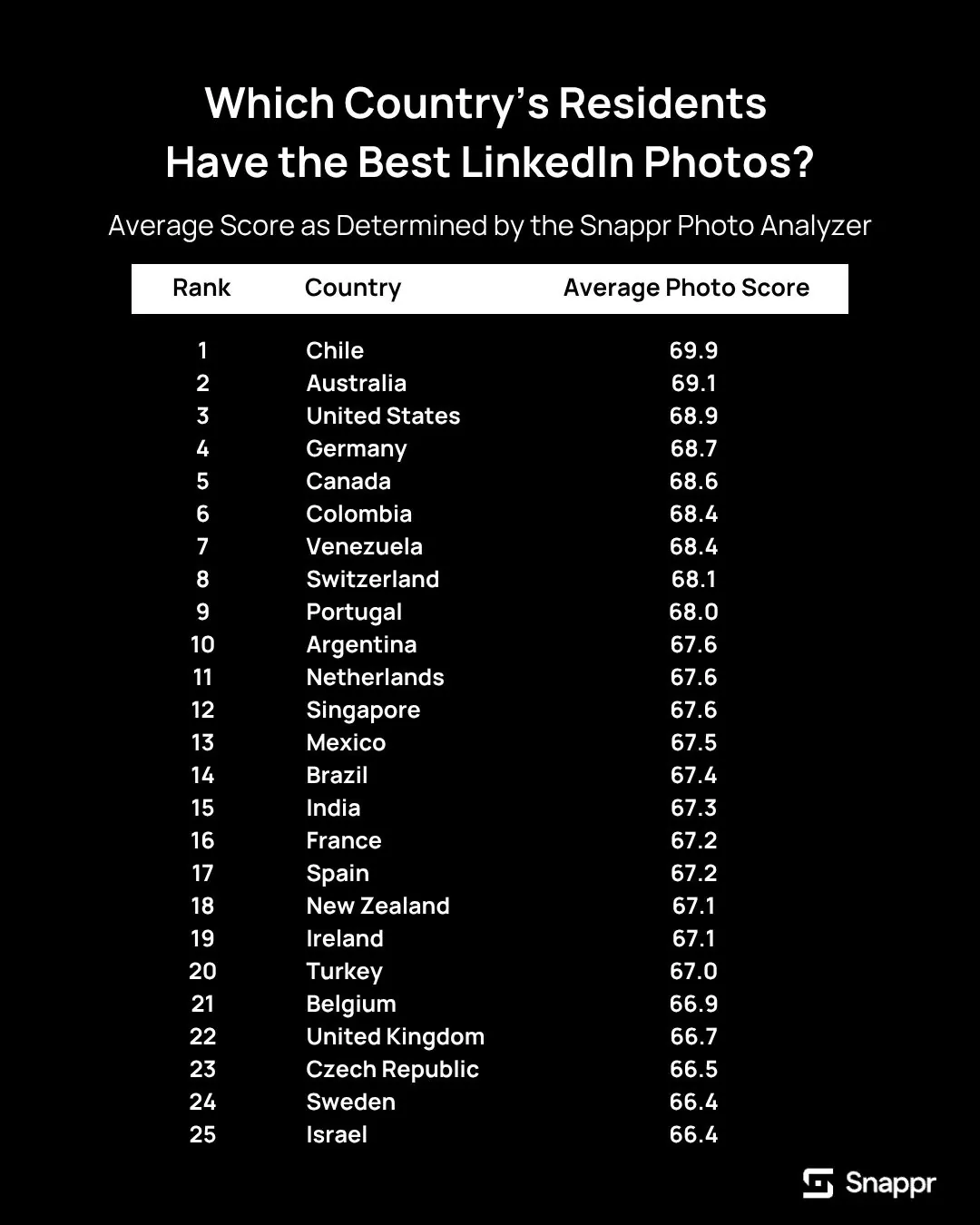
When we mapped Photo Analyzer scores by country, one result stood out: Chile ranks highest for LinkedIn photo quality, followed closely by several other Latin American and European nations.
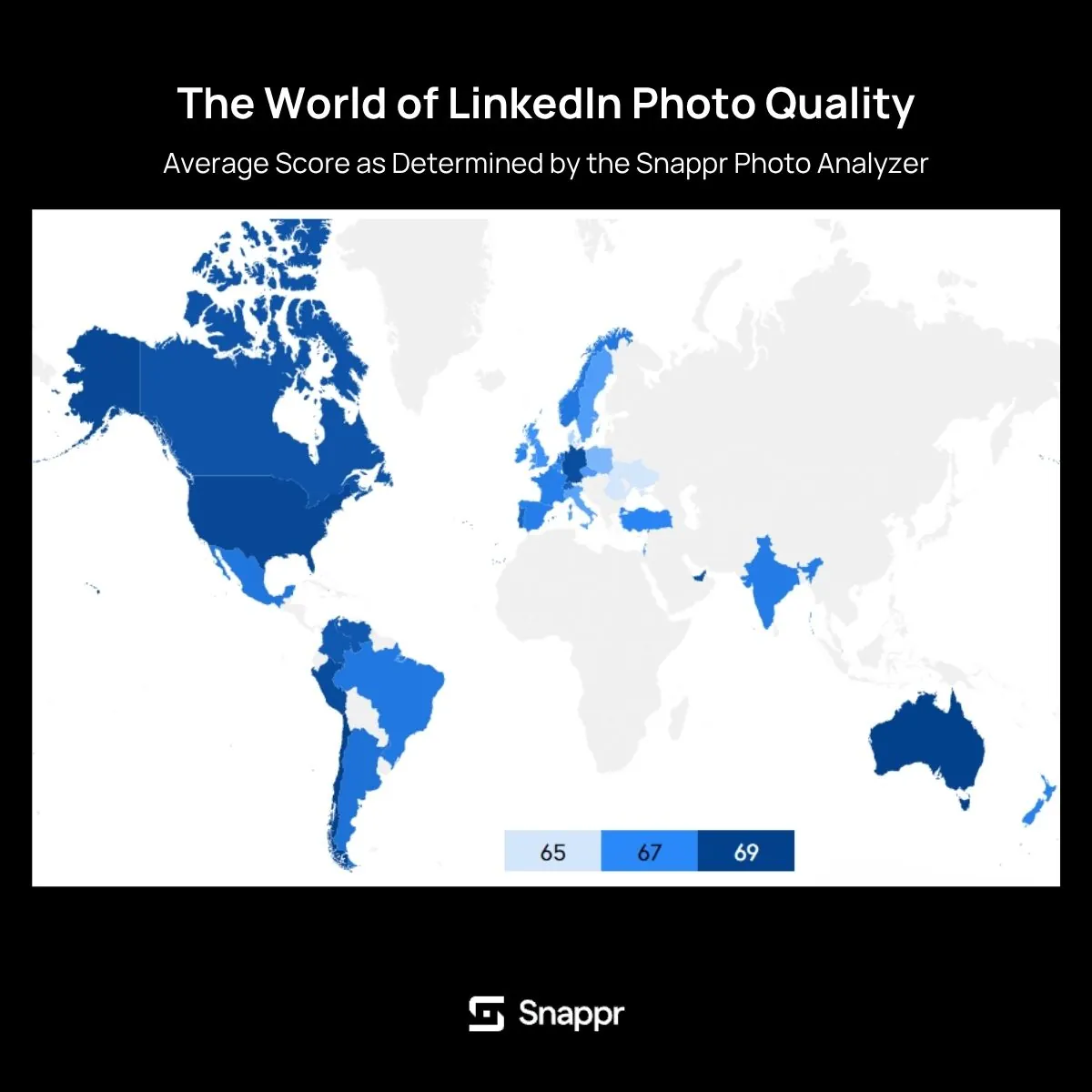
The pattern suggests that cultural norms around professional presentation vary significantly across regions. In countries where professional headshots are a standard part of career development, the average quality tends to be higher across the board.
North American and Western European profiles scored solidly but showed wider variance. The best photos are excellent, but there’s a longer tail of low-quality images pulling the averages down.
Which Industries Score the Highest?

Industry had one of the strongest correlations with photo quality in our dataset. The top-performing sectors were:
- Law
- Consulting
- Investment Banking
- Broadcast Media
- Staffing and Recruiting
The common thread? These are industries where personal presentation is directly tied to credibility and client trust. A lawyer’s headshot isn’t vanity; it’s a professional tool. The same applies to consultants pitching new clients and recruiters whose profiles serve as their storefronts.
Industries with lower scores tended to be those where professionals are less client-facing or where informal culture is the norm. However, this is changing rapidly as remote work makes your LinkedIn headshot your most common first impression.
Does Your Network Size Affect Your Photo Quality?
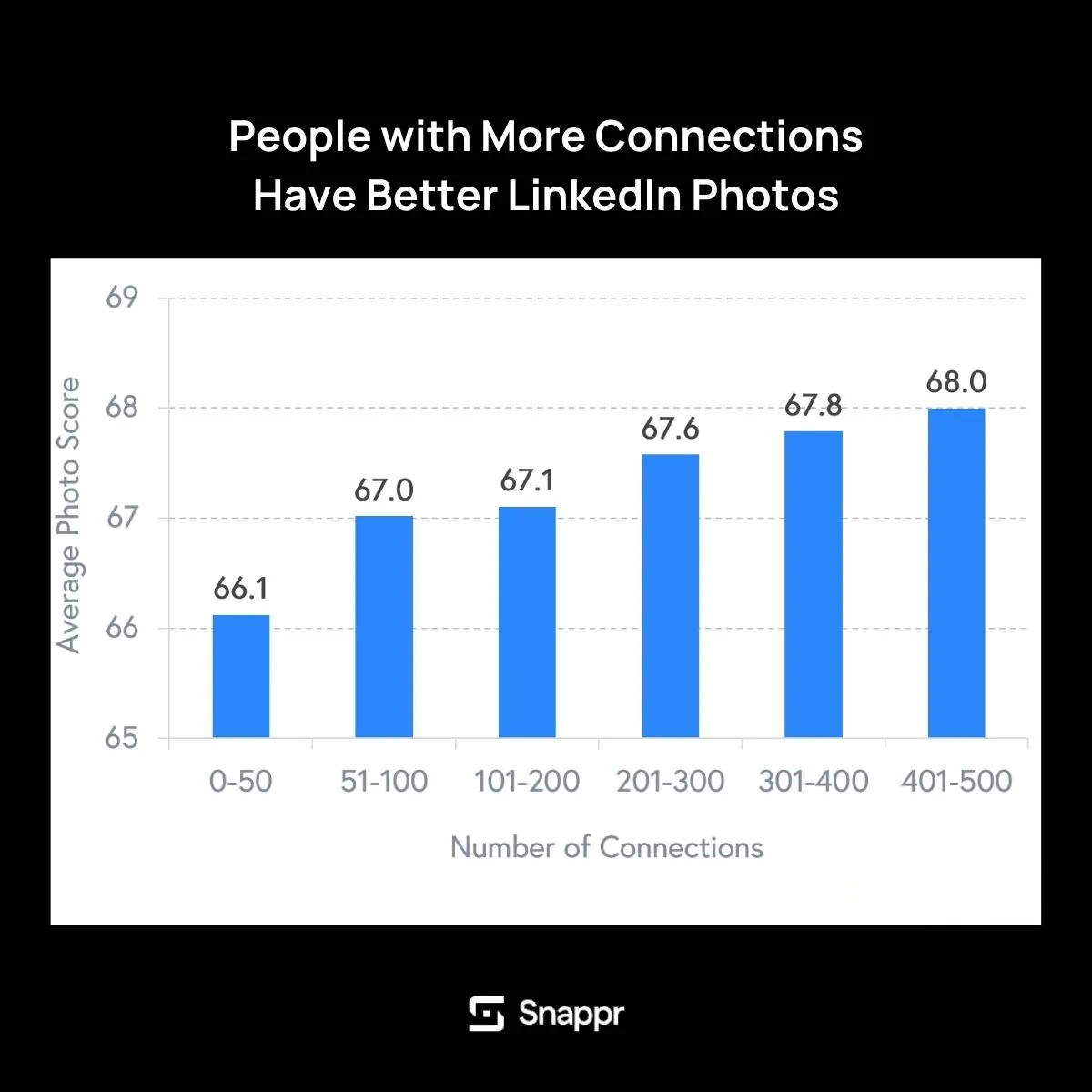
Our data shows a clear correlation: people with larger LinkedIn networks tend to have higher-quality profile photos. The relationship is steady and consistent as connection counts increase.
The likely explanation is bidirectional. Professionals who invest in their LinkedIn presence (including their photo) tend to be more active networkers. And a strong professional headshot may itself drive more connection requests, creating a virtuous cycle.
Either way, if you’re trying to grow your network, your profile picture is one of the best places to start.
The Seniority Paradox
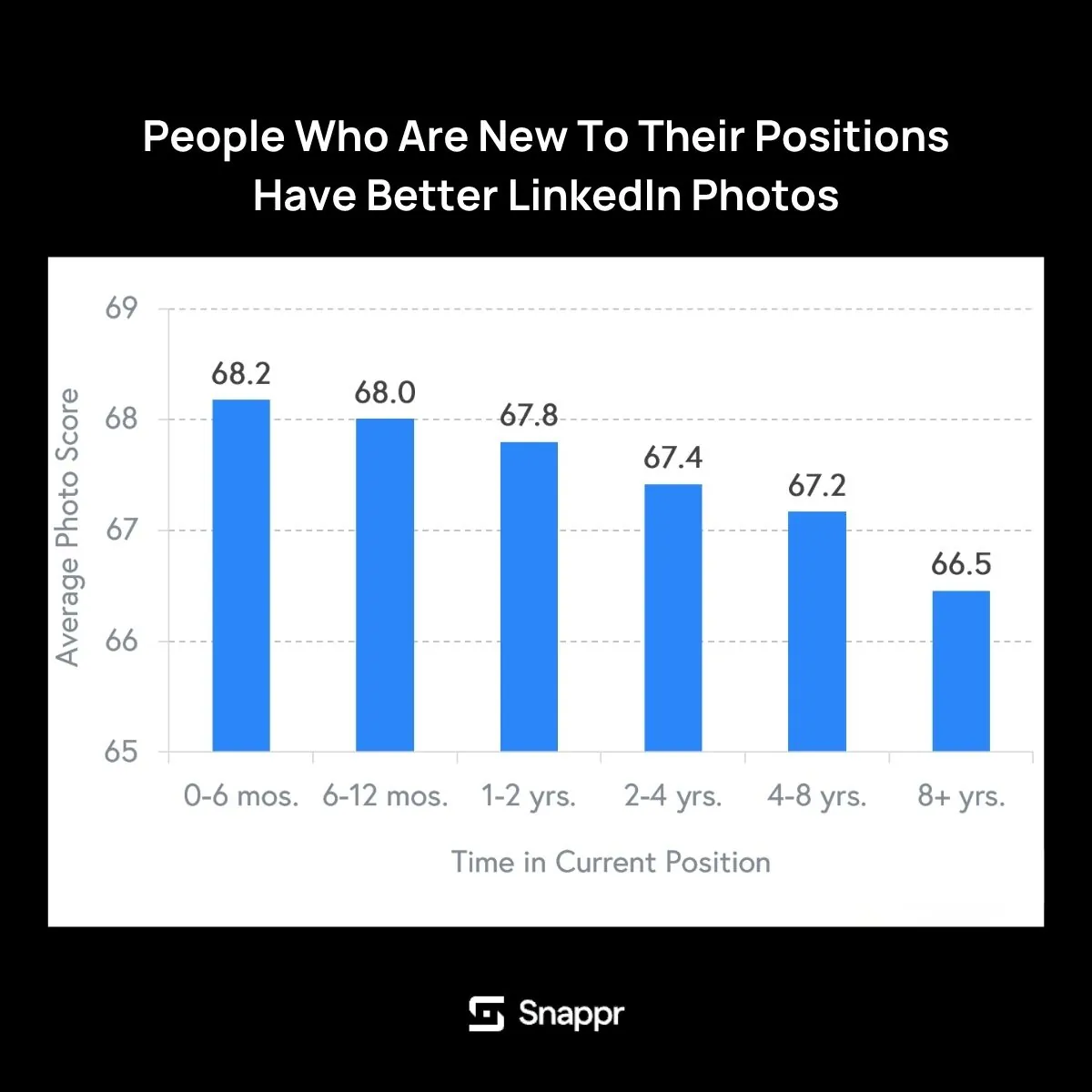
Here’s the most counterintuitive finding in our data: people with more seniority in their current positions actually have worse LinkedIn photos, on average, than newer employees.
Why? The most likely explanation is simple: they uploaded their photo years ago and haven’t updated it since. A VP who’s been in their role for eight years is probably still using the headshot they took when they were promoted. Meanwhile, someone who just started a new job is more likely to have refreshed their entire profile, photo included.
It’s a reminder that your LinkedIn profile picture has a shelf life. What looked current in 2019 reads as dated today.
What Makes a Good LinkedIn Profile Picture
Based on our data and the patterns we’ve observed across tens of thousands of LinkedIn profile photos, here are the elements that consistently separate good LinkedIn headshots from bad ones.
Lighting
Natural, diffused light is the single biggest factor in LinkedIn photo quality. The best LinkedIn headshots use soft, even lighting that eliminates harsh shadows across the face. Indoor photos taken near a large window on an overcast day consistently score highest in our Photo Analyzer.
Avoid overhead fluorescent lighting (it creates unflattering shadows under the eyes) and direct flash (it flattens features and creates a washed-out look). If you’re shooting outdoors, open shade (under a tree or next to a building) gives you the soft, even light that professional photographers look for.
Background
A clean, uncluttered background keeps the focus on you. The most effective LinkedIn profile picture backgrounds are:
- Solid neutral colors: grey, white, or muted blue
- Softly blurred office or outdoor environments
- Simple architectural settings with minimal distraction
Avoid busy backgrounds with visible clutter, other people, or anything that competes with your face for attention. The best LinkedIn headshot backgrounds communicate professionalism without shouting.
Framing and Composition
Your LinkedIn photo should show your head and the tops of your shoulders, centered in the frame. This is the classic headshot composition, and it works because LinkedIn displays profile photos as small circles. Too much body and your face gets lost at that scale.
Fill approximately 60–70% of the frame with your face and shoulders. Leave a small amount of space above your head. And make sure you’re looking directly at the camera. Eye contact matters even in a photograph.
Expression and Body Language
A slight, natural smile consistently outperforms both a neutral expression and a full grin. The goal is to look approachable and confident, not stiff or overly casual.
The best approach: think about something that genuinely makes you happy right before the photo is taken. Forced smiles read as exactly that. A slight head tilt (around 10–15 degrees) can also add warmth without sacrificing professionalism.
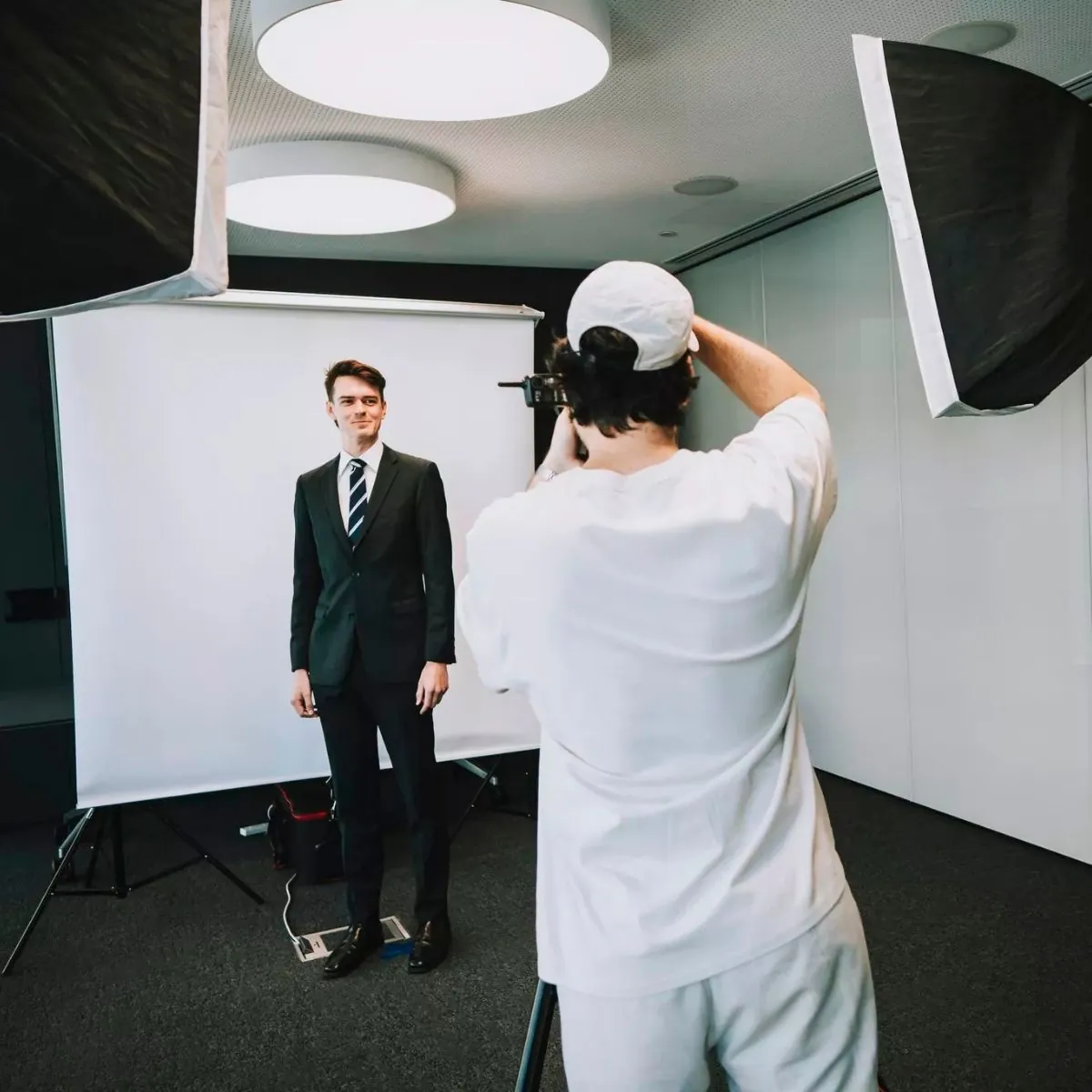
What to Wear for a LinkedIn Photo
Your attire should match the norms of your industry, but lean slightly more polished than your everyday work clothes.
- Finance, law, consulting: A well-fitted suit or blazer in a solid, dark color
- Tech, design, startups: A clean button-down, well-fitted sweater, or smart casual top
- Healthcare: A white coat or professional business attire
- Creative industries: More latitude, but keep it intentional. Your outfit should look chosen, not accidental
Solid colors photograph better than busy patterns. Avoid logos, graphic tees, and anything with thin stripes (they create a moiré effect on camera). A simple neckline that frames your face works best.
Bad LinkedIn Profile Examples: Common Mistakes to Avoid
Some LinkedIn photo mistakes are obvious. Others are subtler but equally damaging to your professional image. Here are the most common patterns we see in low-scoring profiles:
- The group-photo crop. Cropping yourself out of a group photo always looks like exactly what it is. You’ll end up with someone else’s arm in the frame, an awkward off-center composition, and a blurry, low-resolution image.
- The vacation selfie. A selfie taken at the beach, at a bar, or at a wedding sends one clear message: you didn’t think your LinkedIn profile was worth a dedicated photo. Even a well-lit selfie struggles with the close-range distortion that wide-angle phone cameras create.
- The decade-old headshot. If you look noticeably different from your LinkedIn photo, you’re setting up every first meeting for an awkward moment of non-recognition. Your profile picture should look like you right now.
- No photo at all. The default grey silhouette is the worst-performing option by every metric LinkedIn tracks. Profiles without photos receive dramatically fewer views, connection requests, and messages. It’s the single most impactful change you can make to your profile.
- The overly casual shot. Sunglasses, hats, pets, and party settings may show personality, but they undermine credibility in a professional context. Save those for your personal social media.
- The over-edited portrait. Heavy filters, excessive retouching, and obviously artificial backgrounds can look polished at first glance but feel uncanny on closer inspection. Authenticity scores better than perfection.
LinkedIn Headshot Tips by Industry
Different industries have different expectations for professional headshots. Here’s how to calibrate your LinkedIn photo to your field.
- Finance and Law. These are the industries that consistently score highest in our Photo Analyzer data, and there’s a reason: professional headshots are treated as essential tools. Expect a dark blazer or suit, a solid background, and traditional studio lighting. Conservative but polished.
- Technology and Startups. The tech industry runs more casual, and your LinkedIn headshot can reflect that, but casual doesn’t mean careless. A clean shirt, good lighting, and a simple background still matter. You just have more latitude with color and setting.
- Healthcare. A white coat signals authority and expertise. If you’re a physician, it’s a strong choice for your profile picture. For administrators and non-clinical roles, standard business professional attire works well.
- Creative and Media. This is where you have the most room to express personality through your headshot. More creative compositions, interesting backgrounds, and distinctive styling can work, as long as your face is still clearly visible and the image reads as intentional.
- Sales and Recruiting. Your headshot is your storefront. Warmth and approachability matter more here than in most fields. A genuine smile, slightly warmer lighting, and a composition that feels inviting can directly impact your response rates.

How to Take a Good LinkedIn Photo With Your Phone
You don’t necessarily need a professional photographer to get a strong LinkedIn profile picture. Modern smartphone cameras are more than capable if you set up the shot correctly.
- Use the rear camera, not the selfie camera. The rear camera on your phone has a significantly better lens with less distortion. Set a timer or ask someone to take the photo for you.
- Find your light. Stand facing a large window with indirect light. The light should be in front of you, not behind you. Avoid direct sunlight, which creates harsh shadows.
- Set up a clean background. A blank wall, a simple bookshelf, or a solid-color backdrop all work. Remove any clutter from the frame before shooting.
- Get the right distance. Have the photographer stand 4–6 feet away and zoom in slightly (1.5–2x) rather than shooting at the widest angle. This reduces the lens distortion that makes phone photos look like selfies.
- Take a lot of shots. Professional photographers typically shoot hundreds of images to get a handful of great ones. Take at least 50 photos with slight variations in expression and angle, then pick the best one.
- Edit lightly. Adjust brightness, contrast, and warmth. Crop to a headshot composition. Skip the heavy filters. You want a photo that looks like a better version of you, not a different person.
Should You Use AI-Generated LinkedIn Headshots?
AI headshot generators have become increasingly popular, offering studio-quality portraits without a camera. They’re fast, inexpensive, and convenient. But should you use one for your LinkedIn profile picture?
The case for AI headshots: They produce consistent, well-lit, professional-looking results at a fraction of the cost of a traditional photo session. For professionals who work remotely and don’t have easy access to a studio, they can fill a gap.
The case against: AI-generated photos can fall into the uncanny valley. They look almost right, but subtle issues with skin texture, lighting consistency, or eye reflections give them away. They’re also becoming easier to spot as more people encounter them. If someone realizes your headshot is AI-generated, it can undermine the authenticity you’re trying to project.
The verdict: AI headshots are a reasonable interim solution — better than no photo or a bad photo. But for professionals in client-facing roles, leadership positions, or industries where trust and credibility are paramount, a real photo taken by a real photographer still carries more weight. A professional headshot captures something an algorithm can’t quite replicate: the way you actually look when you’re at your most confident and present.
How Often Should You Update Your LinkedIn Photo?
There’s no hard rule, but a reliable guideline is to update your LinkedIn profile picture every one to two years. You should also update it immediately if:
- You’ve changed your hairstyle or hair color significantly
- You’ve gained or lost a noticeable amount of weight
- You’ve changed industries or roles, and your current photo no longer matches the professional context
- Your photo is more than three years old
- You look at your profile and don’t quite recognize yourself
Remember the seniority paradox from our data: tenured professionals tend to have worse photos specifically because they haven’t updated them. Don’t let inertia work against you. A quick refresh of your headshot takes less time than most meetings and has a longer-lasting impact on your career visibility.
How to Get a Professional LinkedIn Headshot That Delivers Results
If our data makes one thing clear, it’s that the quality of your LinkedIn profile picture directly correlates with professional outcomes: more profile views, more connection requests, and more messages from recruiters and potential clients.
While DIY phone photos can get the job done in a pinch, there’s a noticeable quality gap between a self-shot photo and one taken by an experienced portrait photographer who understands how to work with lighting, angles, and composition to bring out your best.
Snappr connects you with professional photographers in over 200 cities, with sessions that typically take 15–30 minutes and deliver polished, ready-to-use headshots within 48 hours. You can book a portrait session in under 60 seconds.
For companies looking to upgrade their team’s LinkedIn presence at scale, whether it’s a leadership team, a sales organization, or an entire distributed workforce, Snappr’s enterprise photography solutions handle everything from scheduling across multiple locations to maintaining brand consistency across hundreds of headshots.
And if you want to see where your current photo stands before booking anything, try the free Snappr Photo Analyzer. It takes seconds and gives you a data-backed score along with specific suggestions for improvement.
Frequently Asked Questions
What Is the Ideal Size for a LinkedIn Profile Picture?
LinkedIn recommends a profile photo between 400 x 400 pixels and 7,680 x 4,320 pixels. The image displays as a circle, so make sure your face is centered, and nothing important is near the edges. A square crop at 800 x 800 pixels is a reliable standard.
Should My LinkedIn Photo Be in Color or Black and White?
Color is the standard and generally recommended. While black-and-white photos can look striking, they can feel dated or overly artistic for a professional networking platform. If you do choose black and white, make sure the contrast is strong, and your face reads clearly at a small size.
Can I Use a Casual Photo on LinkedIn?
It depends on your industry. In creative fields, tech startups, or roles where personality is valued, a slightly more casual LinkedIn headshot can work, as long as it’s still well-lit, well-composed, and intentional. In more traditional industries like finance, law, or healthcare, stick with a conventional professional headshot.
Is It Worth Hiring a Photographer for LinkedIn Photos?
The data suggests yes. Professional headshots consistently score higher across every metric we track, and the investment is modest compared to the career impact of a strong LinkedIn presence. A single session typically costs less than a business lunch, and the photos last several years.
What Background Works Best for a LinkedIn Headshot?
Neutral, solid-color backgrounds in grey, white, or muted blue consistently score highest in our Photo Analyzer. Softly blurred office or outdoor environments also perform well. The key principle is keeping the viewer’s focus on your face, not on what’s behind you.
Is It Okay to Use a Graduation Photo on LinkedIn?
A graduation photo can work for recent graduates entering the job market. It signals achievement and is usually taken professionally. However, once you’ve been in the workforce for more than a year or two, it’s time to update to a headshot that reflects your current professional identity.


