How to Book a Photography Session: A Step-by-Step Guide
Book a top photographer in about two minutes. See real pricing and browse real portfolios before you pay a dollar. Here’s exactly how it works.
Get your quote
Two minutes. That’s all it takes to book your next shoot.
What kind of service?
Tell us whether it’s photos or video you’re after. Some links answer this for you (arrive from a videography page and we already know) and skip you straight to the next step.
Business or personal?
Tell us who the shoot is for. Pick the one that matches who’s paying and what the photos are for, because it shapes everything that follows.
What do you need to shoot?
Pick your shoot type. Business shoots cover 13 commercial categories, from portraits to product; personal shoots offer 19, grouped by occasion.
Where is the shoot?
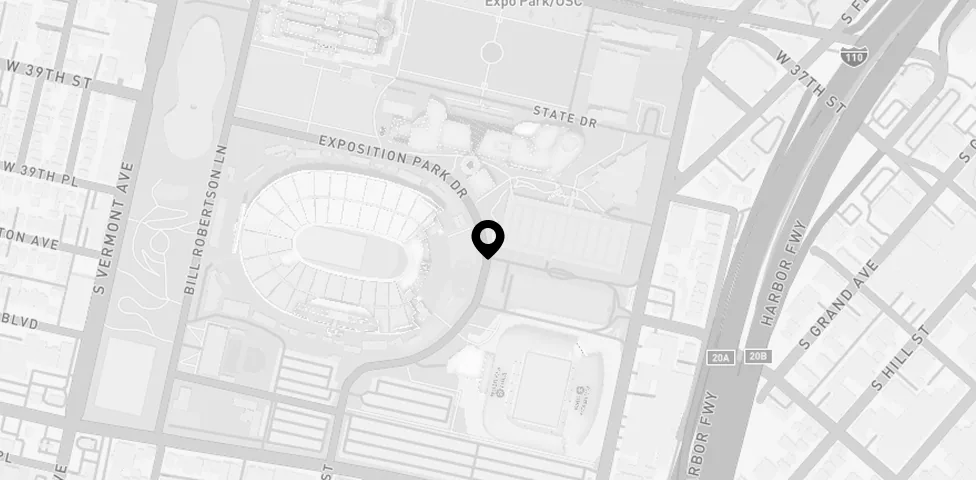
Type your address and pick the right match from the autocomplete. The map preview confirms the spot before you continue.
Your contact details
Your name and email are what unlock pricing and photographer portfolios for your area. First time booking? You go straight through. There is no password to create and nothing to confirm by email. We also email you a link to your booking, so you can come back and pick up where you left off.
Shape the shoot
Set your shoot’s duration or area size, choose the package that fits (with live pricing for your area on every option), then leave us a mobile number for the day.
How long is the shoot?
Drag the slider to set how long you need your photographer for. A few shoot types are measured differently: real estate and virtual tours by square footage, product shoots by how many items you need photographed.
Your mobile number
With the package set, we ask for a mobile number, which is what lets your photographer reach you on the day of the shoot. Agree to SMS updates with the tick box, and the next screen is the calendar.
Date, time and photographer
Lock in a time that works for you, then browse real portfolios and pick the photographer who fits your shoot.
Pick a date
Choose the day you want to shoot. If no photographer is available on that date, we’ll do our best to find a pro for you.
Then pick a time
Pick a start time. Slots run in half-hour steps from morning to evening. A grayed-out slot means there are no available photographers for your location in the date you chose.
Choose your photographer
This is the step worth slowing down for. Every photographer free at your date and time comes with their portfolio right there on the card. Open it to see their recent work, read their bio and specialties, and check how many Snappr customers they’ve delighted. Pick the one whose work you like, or go with our recommendation.
Confirm and pay
One last look at your details and total, then pay securely to lock in your shoot.
Confirm and proceed to payment
Review everything in one place (your details, shoot time, package and total), then pay to lock in your shoot. Your slot is held while you review.
After payment
Once you’ve paid, a few short screens follow. You can set a password for your account if you haven’t already, tell your photographer the style of photos you’re after (and upload reference photos), and add anyone joining you on the shoot so we can keep them in the loop once the photos are ready. Your edited photos arrive in your online gallery, usually within 48 hours of the shoot.
Answers before you book.
How much does it cost?
It depends on your location, shoot type, duration, and which package you pick: Budget (also called Value) covers a set number of edited photos and is available on your first shoot only, All-inclusive covers every photo from the shoot. Editing, full commercial rights and 48-hour delivery come with both.
How long should I book for?
It depends on the shoot type, and on how much has to happen inside the hour.
A single-person portrait or headshot session is comfortable in an hour. The things that push you longer are extra people, extra outfits, and extra locations. Five people in five different outfits is a different shoot from one person in one. Events and weddings are driven by the run of the day rather than by a shot list, so book to cover the part of the day you actually want photographed.
If you’re between two lengths, take the longer one. The extra time is what makes a shoot feel unhurried, and what gives you room to try a second setup, redo a shot you weren’t happy with, or let a nervous kid warm up. Your photographer does better work when they aren’t watching the clock, and you get more out of the session.
Not sure? Message our team before you book and we’ll recommend a length for what you’re shooting.
How many photos will I get?
It depends on the package and the shoot type.
All-inclusive shoots give you every unique selection from the shoot: the photographer’s full set of usable frames, edited and delivered. There’s no cap, so the number scales with how long you book and how much is happening.
Budget shoots, available on your first booking only, give you a set number of edited photos. The photographer makes the selects and shares the gallery from the shoot, and you receive that fixed set.
The fixed count depends on the duration of the shoot.
What editing is included?
Every image you receive has been edited. Your photographer handles standard editing, color correction, exposure, and general image enhancement. What lands in your gallery is finished, not raw camera files.
Advanced work is not part of a standard booking. That includes face and skin retouching, object and background removal, virtual staging, and sky replacement. If you want any of that, our Magic Studio Pro feature can take your delivered images further.
Why does it ask for my email before showing prices?
We email that address a link back to your booking so you can pick up where you left off, and the same details become your login. First-time customers go straight through, with no password to create and no email to confirm. If you have booked with us before, the screen asks for your password, or emails you a magic link if you never set one.
How far ahead should I book?
As early as you can, since availability is widest with a few days’ notice. Short notice is often fine too: in well-covered cities you can book with as little as two hours’ notice.
What if I don’t know exactly what I need?
Pick the closest shoot type. It is what matches you with a photographer who specializes in that kind of work, and the categories are broad. You can add specifics in the later steps, and there is an “Other” category if nothing fits.
Do you cover my city?
Instant booking covers the US, Canada, the UK, the EU, Australia, New Zealand and Singapore (roughly 90% of the population in those markets), plus parts of the Philippines and Israel. Enter your address at step 4 and pricing and availability are worked out for your exact area.
Why does product photography ask so many questions?
Product quotes are built from SKU count and shot list rather than hours, so the extra questions are what price the shoot accurately.
Can I change the date?
Yes. Open the shoot in your dashboard and use “Make booking changes”. Every booking includes one free change of date or location; changes after that carry a fee. Make it more than 24 hours ahead, or contact support if you are inside that window.
What’s the turnaround?
Your edited photos arrive as a link to your online gallery, usually within 48 hours of the shoot. Events and parties take up to 72 hours, and weddings up to 96.