How to Book a Videoshoot: A Step-by-Step Guide
Book a professional videographer in a few minutes. See real pricing and browse real videographers before you pay. Here’s exactly how it works.



Get your quote
Two minutes. That’s all it takes to book your next videoshoot.
What kind of service?
Choose Videoshoot here. Some links answer this for you: arrive from one of our videography pages and we already know, so you skip straight to the next step.
Business or personal?
Tell us who the shoot is for. Pick the one that matches who’s paying and what the footage is for, because it shapes everything that follows.
What do you need to film?
Pick your shoot type. Business videoshoots cover 12 commercial categories, from events to aircraft; personal shoots offer 18, grouped by occasion. There is no Portrait option for video.
Where is the shoot?
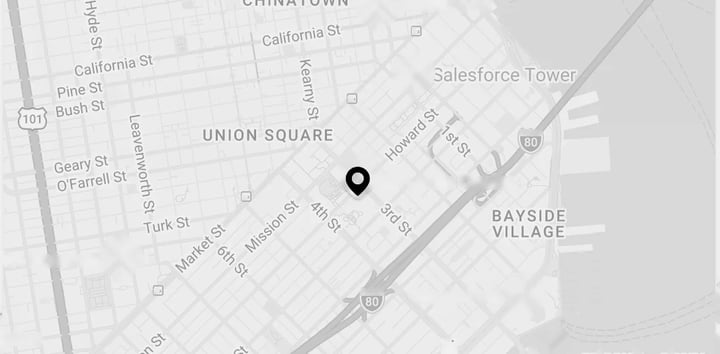
Type your address and pick the right match from the autocomplete. The map preview confirms the spot before you continue. The optional field is worth filling: floor, suite, gate code, or where to meet saves real time on the day.
Your contact details
A short “Hold tight while the magic happens…” screen checks coverage for your address, then asks for your email. That address is what unlocks pricing and videographer portfolios for your area. First time booking? You go straight through: no password to create, nothing to confirm by email. We also email you a link to your booking so you can pick up where you left off.
Shape the shoot
Set how long you need your videographer, see live pricing for your area, then leave us a mobile number for the day.
How long will your shoot be?
Drag the slider in half-hour steps from 1 to 4 hours (“Show more” goes longer). It defaults to 3 hours, the most popular length. There is one package for video: all equipment supplied by the videographer, RAW footage delivered. The price shows with fees included for your area.
Your mobile number
With the package set, we ask for a mobile number so your videographer can reach you on the day. Agree to SMS updates with the tick box, and the next screen is the calendar.
Date, time and videographer
Lock in a time that works for you, then browse real portfolios and pick the videographer who fits your shoot.
Pick a date
Choose the day you want to film. Any date from tomorrow onward can be picked; same-day booking isn’t offered for video. A dot under a date means not all videographers in your search area are free that day.
Then pick a time
Pick a start time. Slots run in half-hour steps from 6:00 AM to 11:30 PM, laid out as Morning, Afternoon and Evening. A grayed-out slot means no videographer is available for your location at that time on the date you chose.
Choose a videographer
This is the step worth slowing down for. Every videographer free at your date and time comes with their portfolio right there on the card. Read their bio, open their recent work, and check how many Snappr customers they’ve delighted. Pick the one whose work you like, or go with our recommendation.


Confirm and pay
One last look at your details and total, then pay securely to lock in your shoot.
Confirm your shoot details
Review everything in one place (your details, address and time, package, service fee and total), then pay to lock in your shoot. Video is paid in full, with no deposit. Your slot is held for five minutes while you review, and a coupon or gift card code can be added at the bottom.
After payment: tell us the goal of your video
Once you’ve paid, one short screen follows. Describe what the video is for and paste links to any references you like. Your videographer gets your brief before the shoot. Raw footage arrives in your online gallery, usually within 48 hours of the shoot.
Want a finished, edited video?
The base booking delivers raw footage. Edited videos with music are an add-on, from a 1-minute edit up to 90 minutes. Ask our team to add it.
Ask our teamAnswers before you book.
How much does a videoshoot cost?
It depends on your city and how long you book. Prices appear live, service fee included, once you enter your address and email. One package covers the shoot: the videographer brings the equipment and you get the RAW footage. Editing is an add-on.
Do I get edited video or raw footage?
The base booking delivers RAW footage only. All equipment is supplied by the videographer, but editing isn’t included. Edited videos with music are an add-on, from a 1-minute edit up to 90 minutes. Ask our team to add it to your booking.
How long should I book a videographer for?
Book to cover the part of the day you actually want filmed. An interview or a short product piece is comfortable in an hour. Events run with the day, so cover the parts you want on film. If you’re between two lengths, take the longer one: unhurried footage is better footage.
What’s the turnaround?
Raw footage arrives as a link to your online gallery, usually within 48 hours of the shoot. If you add an edit, our team confirms the edit’s turnaround when they add it.
Is videography available in my city?
Not everywhere yet. Enter your address at step 4; if your area isn’t covered, the flow tells you and we’ll reach out when it is. Prefer to talk it through? Message our team.
Can I book photos and video for the same event?
Yes, as two bookings. Book the videoshoot here, then start a second booking and pick Photo shoot at step 1 with the same address, date and time; our guide to booking a photoshoot walks through it. Our team can help line the two up.
What if I don’t know exactly what I need?
Pick the closest shoot type. It matches you with a videographer who specializes in that kind of work, and the categories are broad. You describe the goal of the video after payment, and there is an “Other Event” category if nothing fits.
Can I change the date?
Yes. Open the shoot in your dashboard and use “Make booking changes”. Every booking includes one free change of date or location; changes after that carry a fee. Make it more than 24 hours ahead, or contact support if you are inside that window.