

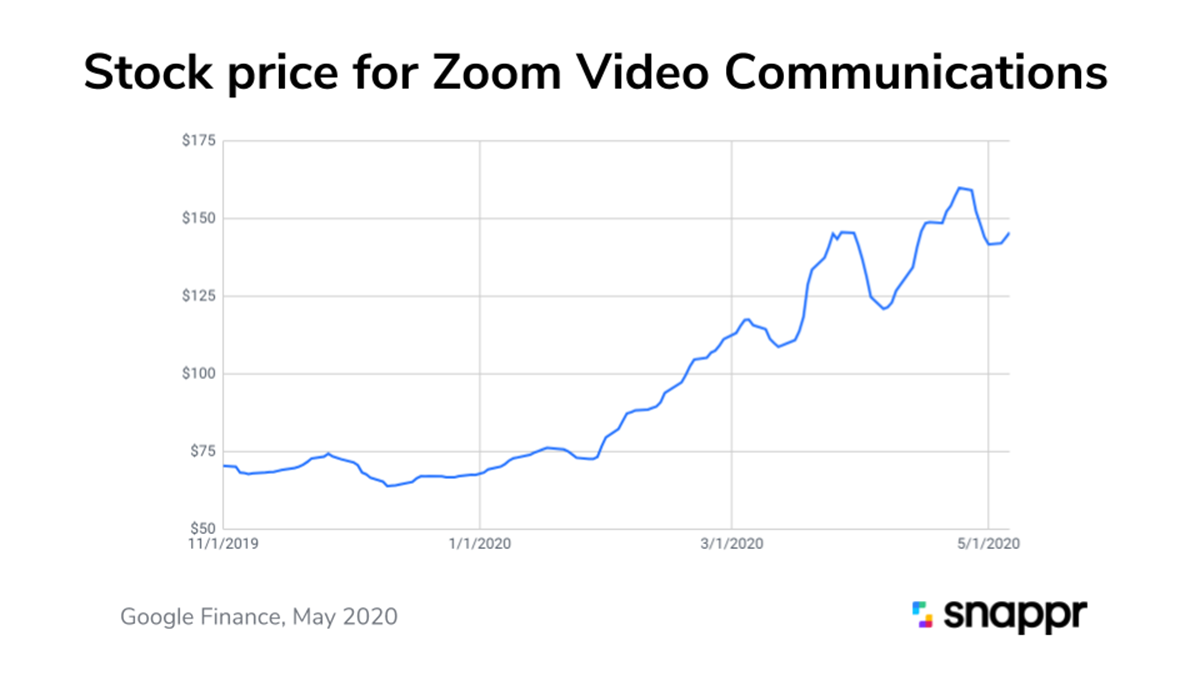
Video conferencing technology came into use in the 1980s and has seen slow, steady growth in adoption. That is, until recently when COVID-19 and remote work have seen an explosion in adoption. Since March 2020, downloads for video conferencing apps have increased by more than 30x in the US, and in other countries such as Italy and Spain, download rates have increased by 140x. Zoom’s stock price has almost tripled since January 2020. Its not just about work meetings or family and friend catch ups… we’ve also seen the birth of remote dates! A study by Forbes compared video to audio-only calls and found that 68% of people preferred video, and 78% said that video improved their sense of connectedness. It is safe to assume video calls will remain popular even after people return to the office, and working from home is going to stay popular too. As such, we should all invest in improving our video conference game. But how?
Let’s face it, most video conference appearances look like something filmed in the 1990s on a VHS and are either too dark, too bright, too pixelated, or badly framed with “too much information” in the background. Video quality might not be a huge deal for personal calls, but it does matter for important business calls with clients, board meetings, or sales pitches. A business professional wouldn’t attend an important meeting wearing a cheap $20 suit, but most people are still having important business video calls with a $20 webcam.
On the Snappr team, we’ve been putting our expertise to good use by rigging up professional DSLR webcams. Check out the difference for yourself.


I spend a lot of my day on video calls. Since my new setup, I’ve barely joined a call without someone commenting on the production quality. “Is that a new Zoom filter?” has been a common question. But the truth is that it comes down to hardware more than software.
Here are the main elements you need to create that ‘studio look’.
A camera with a big sensor
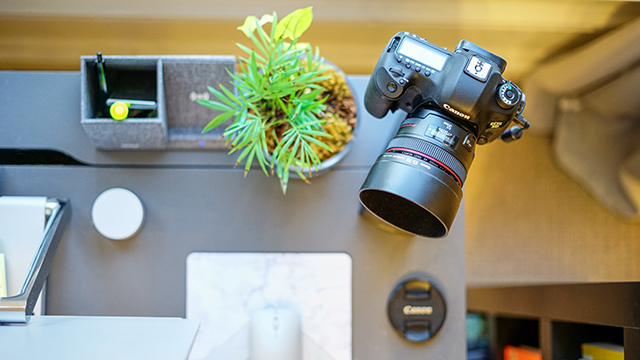
Any modern DSLR or mirrorless camera will do the trick. Here I’m using my trusty Canon 5D MkIII, one of the workhorses of the professional photography industry, with a full-frame (35mm) sensor. This model now has a newer cousin, so you can pick one up on eBay for less than $1,000. This is my regular camera so I had it around, but if you’re buying something for this purpose, it is way overkill. The jumbo sensor is good for low light conditions, but you can definitely get away with a much smaller mirrorless camera with an APS-C size sensor, like the Canon M100 or Sony a6000, each of which goes for less than $500 new on Amazon. And once the shutdowns are over you’ll have yourself a wonderful camera that will blow your iPhone away!
A wide aperture lens
In my setup, I’m again going a little on the overkill side with a Canon EF 50mm f/1.2L lens, which will set you back more than $1,000 new. It is a prized lens because of its huge aperture, which can produce that beautiful creamy “bokeh” or background blur that you see in the sample image. The kit lens (the one that comes included) on any DSLR or mirrorless camera you can get your hands on will do just fine. If you get something like the M100 or a6000, we’d recommend picking up what’s often referred to as a “nifty fifty” lens - that is, a 50mm lens with a f/1.8L aperture. These are what’s known as a prime lens (no zoom) but will give you a nicer bokeh or background blur than a typical kit lens. They go for around $100, so well worth the investment.
A good light source, preferably natural
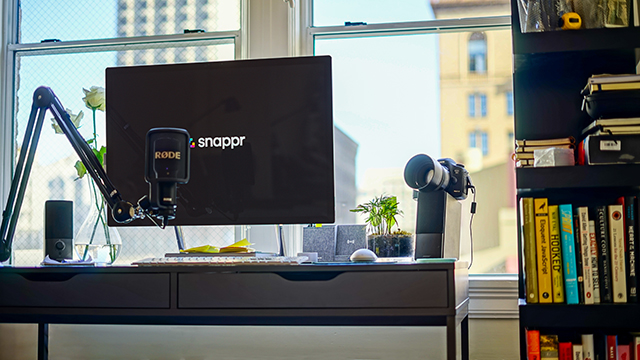
My home office desk is in front of a large window, which is perfect for illuminating your face with natural light. Whether it is natural or artificial, what you need is a good diffuse light source. Direct sunlight, or light from one single lamp will produce a harsh result. One nice thing about videoconferences is that you’re typically going to be sitting in front of a monitor, so that light will help, particularly at night.
The right angle
One of the unfortunate things about in-built computer webcams is that they are directly in front of you, leading to a straight-on angle and symmetrical framing. This doesn't look the best. To create a greater sense of authority and trustworthiness, you should use a slightly lower angle by having your camera closer to desk-height. In terms of horizontal angle, you will get the best results by having your camera off to the side. Don't worry about not looking directly into the camera - this actually creates a more dramatic, interview-style look. In my case, I have my 5D sitting on a speaker off to the right of my computer, angled slightly up.
A continuous camera power supply
DSLRs and mirrorless cameras are designed to be used out and about, on battery power. If your camera doesn’t come with an AC power adapter that plugs directly into the camera body, then pick one up online to save yourself from constantly switching batteries or having your camera die in the middle of a meeting.
A wired connection to your computer
Your camera should come with a method to create a wired connection with other devices, typically a USB or mini-HDMI cable. With my Canon 5D, I’m connecting it to my PC via USB. HDMI connections typically require special hardware, so will add to the cost of your setup and will slow you down in getting started.
A shout out to Garry Tan from Initialized Capital who beat us to blogging about this topic, and who has a video guide on how to go down the HDMI route.
Software to capture the video stream
Unfortunately these setups won’t start appearing in Zoom or Google Hangouts out of the box… you’ll need to download some software. I’m using Windows and back in March I stumbled upon a little-known but neat app called SparkoCam which can turn most Canon or Nikon cameras into a virtual webcam. If you’re a Mac user you can download Camera Live and Cam Twist to achieve something similar (check out guides elsewhere). Since we at Snappr created our setups, Canon has also come to the table with a software release, but naturally this only works for a limited range of Canon cameras.
Bonus: a good microphone
If you’re going to invest in a good camera, why not upgrade your mic too? You can see in my home office setup, I’m using a Rode NT-USB microphone on a Rode swivel mount (PSA-1) boom arm. Brand new, these can be bought for $169 and $99 respectively, so a bargain compared to the cost of camera equipment.
-
This video conferencing setup is a good analogy for what we do at Snappr: combine great hardware, great software, and the expertise to bring them together. We are the largest network of on-demand professional photographers in the world, powered by cutting-edge logistics and editing technology.
If you are part of a business that sells itself online, then you probably know how important visual assets are for your bottom-line. If you are looking to improve your company's visual content beyond your video conferencing look, the Snappr for Enterprise team would be happy to provide you with a free audit and recommendations.


